KYB Onboarding UX: Why Business Customers Stall for Weeks (and It Isn't the Compliance Team's Fault)
Business verification has a dirty secret. When a B2B fintech says "KYB takes three weeks," the compliance decision is usually a small slice of that time. Most of it is waiting on people who don't know what you asked for, don't know who you are, and don't know they're the bottleneck.
That is a design problem. You can't remove the checks. You can absolutely design the weeks around them.
What founders are running into
Search for this topic and you mostly find identity vendors explaining how to reduce KYC drop-off. Useful, but almost all of it is about one person with a phone and a driver's license. Business onboarding is a different animal.
A B2B fintech founder on r/fintech put real numbers on it. A clean single-owner company takes about a week to verify. Anything with layered or cross-border ownership averages three weeks, sometimes more than a month. Forty percent of their business signups last quarter never finished. Their own diagnosis was the honest part: most of the delay is chasing certified documents from directors who don't answer email and don't understand what's being asked.
A separate founder on r/SaaS watched sign-up conversion drop by about half the week they turned on mandatory verification. The replies were blunt. Verification didn't tank the funnel. Springing it on people cold did.
Why KYB breaks differently than KYC
Consumer KYC is one person, one session, one device. KYB is none of those things.
It's multi-person.** The person who signs up is often an ops lead or a finance manager. The documents and the ID checks belong to directors and beneficial owners who never asked for your product.
It's multi-session.** Nobody keeps a certificate of incorporation or a shareholder register in their back pocket. People leave to find things. If the flow can't take them back to the exact step they left, they don't come back.
It's multi-outcome.** A business check rarely returns a clean yes. It returns "need one more document," "ownership doesn't match the registry," "escalated to review," or "approved for a lower limit." Most products collapse all of that into one word: Pending.
Put those together and you get the pattern from that thread. The applicant thinks they're done. A director is ignoring a vague email. Your ops team is chasing both by hand. Everyone assumes someone else is holding it up.
How to design KYB onboarding that actually finishes
Show the whole checklist before step one.** List every document and every person you'll need, in plain language, before anyone types a field. "You'll need your incorporation certificate, a list of anyone who owns 25% or more, and a photo ID from each of them." Surprise kills multi-session flows. A list people can prepare for saves them.
Ask for nothing you can look up.** If a registry or data provider can return the legal name, address, officers, and filing status, pull it and ask the applicant to confirm. Confirming is fast. Compiling is where people quit.
Design the owner invite like it's your most important email.** For many directors, it's the first time they've heard of you, and it's asking for their passport. Name the company that invited them and the person who did it. Say in one line why it's required and how long it takes. Send them to a page that looks like your product, not a vendor's generic screen. A director who thinks the request is phishing will never finish.
Give the applicant a status they can act on.** Not "Under review." Show who still owes what: "Waiting on Priya's ID. Invite sent Tuesday. Resend or change who verifies." Now the applicant can do your chasing for you, internally, where they actually have influence.
Write a screen for every outcome.** List every result your verification provider and your compliance team can return, then design a distinct state for each one with the specific problem and the specific next action. Keep everything the business already entered. Never restart a six-step flow because one document was the wrong format.
Let low-risk businesses in early.** If your rules allow it, give approved basics, a sandbox, or a lower limit while the rest of verification runs. The best line in that Reddit thread belongs on the wall: "you're in, we're just finishing paperwork" feels nothing like "you're still in the queue."
Instrument by person and by step.** Funnel analytics built for one user per signup will lie to you here. Track each owner invite separately, time from invite to completion, and which outcome screens people stall on. That tells you whether you have a sequencing problem, an invite problem, or a review-capacity problem. They need different fixes.
Teardowns: three KYB flows against this framework
We pulled public onboarding UIs and help screens from Stripe Connect (the Furever demo plus Express guidance), Persona KYB, and Brex, plus Mercury's document checklist. Fair-use screenshots of public demos and docs, for commentary. Product names attributed. No partnership claim. No invented numbers.
Stripe Connect (Furever demo + Express)
Furever is Stripe's public Connect demo for marketplace-style business onboarding. It is the clearest live example we found of early access done without apology.
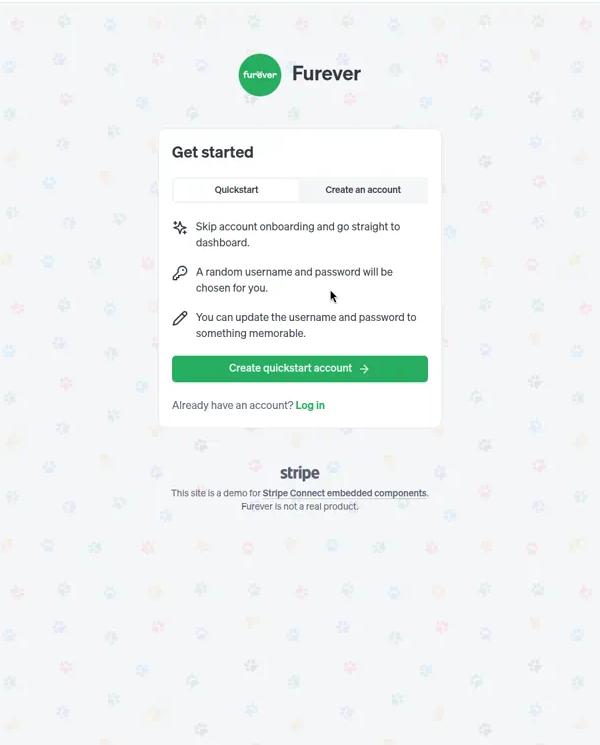
That matches the Reddit line about finishing paperwork after you're already in. The demo then runs a real embedded Connect step.
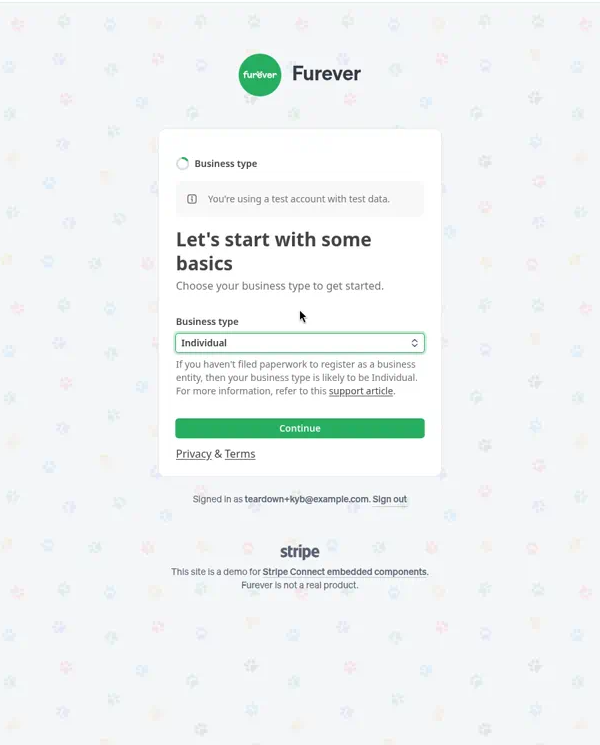
Progress is stepwise and visible. A checklist dropdown shows completed, current, and upcoming work. Strong multi-session design. What it is not: a full document and person list before step one.
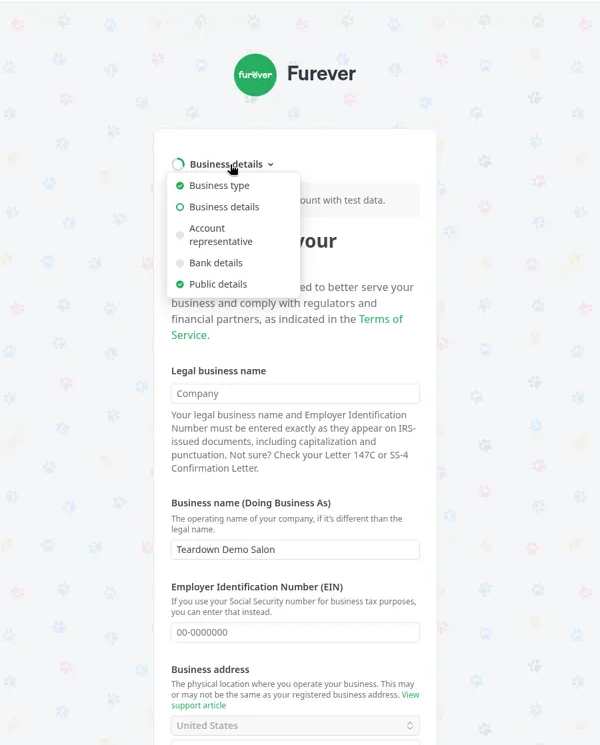
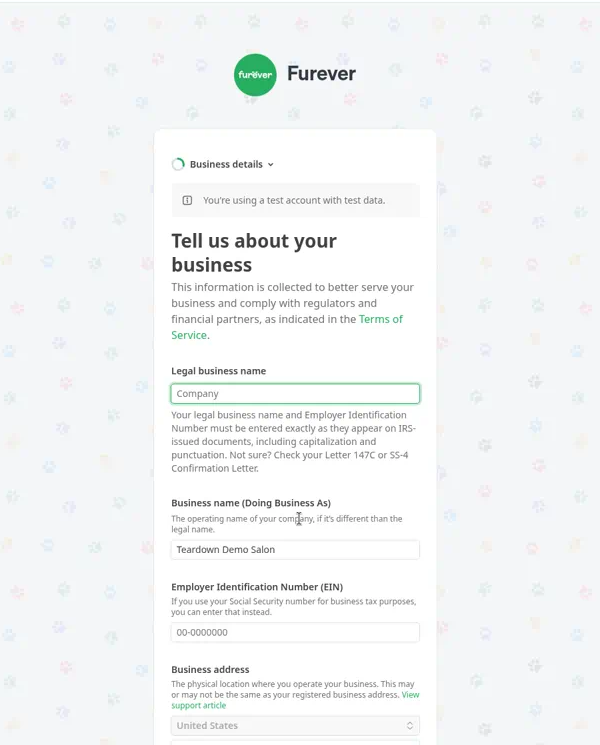
EIN guidance names Letter 147C and SS-4, which helps when people get there. It still arrives mid-flow.
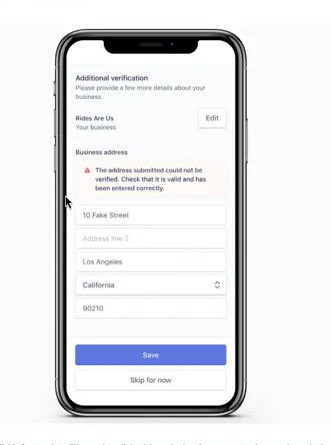
Stripe's Express write-up shows remediation we want more products to copy: a named failure, a fix path, and a skip if they cannot resolve it now.
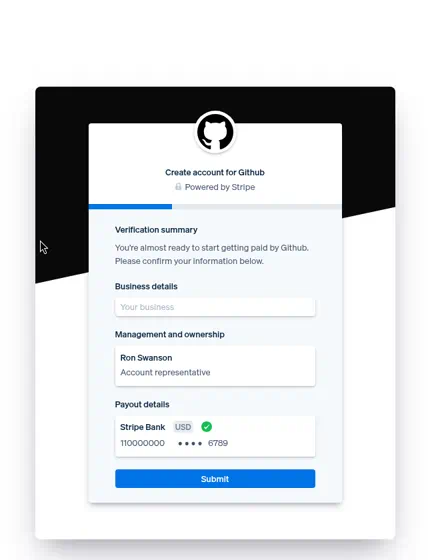
Connect marketing also shows a verification summary before submit: business, ownership, payout in one confirm screen.
Stripe against the framework:** strongest on early access and stepwise progress. Solid on remediation and a confirm summary. Lighter on checklist-upfront for every document and person before anyone starts.
Persona KYB
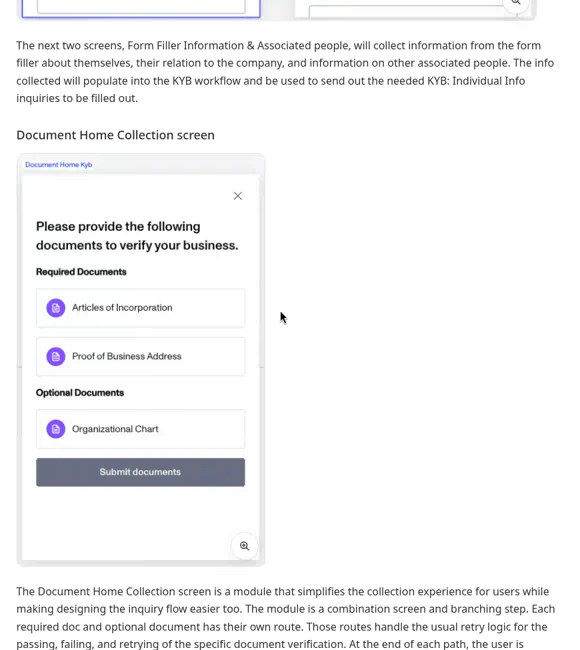
Persona's public KYB example flips the emphasis. Document Home puts required and optional documents on one screen before submit. Checklist-upfront done properly.
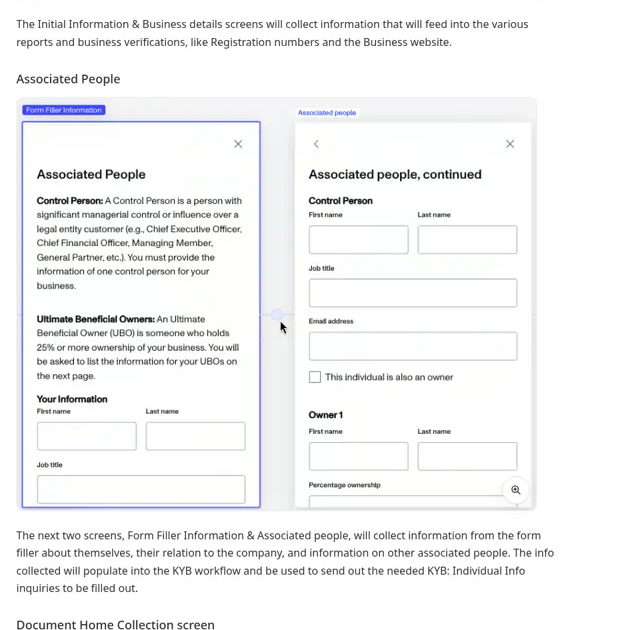
Associated People defines Control Person and UBO in plain language, then collects control-person email and ownership so Individual Info inquiries can go out. That is the owner-invite model, not "paste everyone's passport yourself."
Registry results show distinct checks: Identity Comparison passed, Associated Persons Comparison failed, input vs record row by row. Anti-Pending design. Pass and fail are separate outcomes.
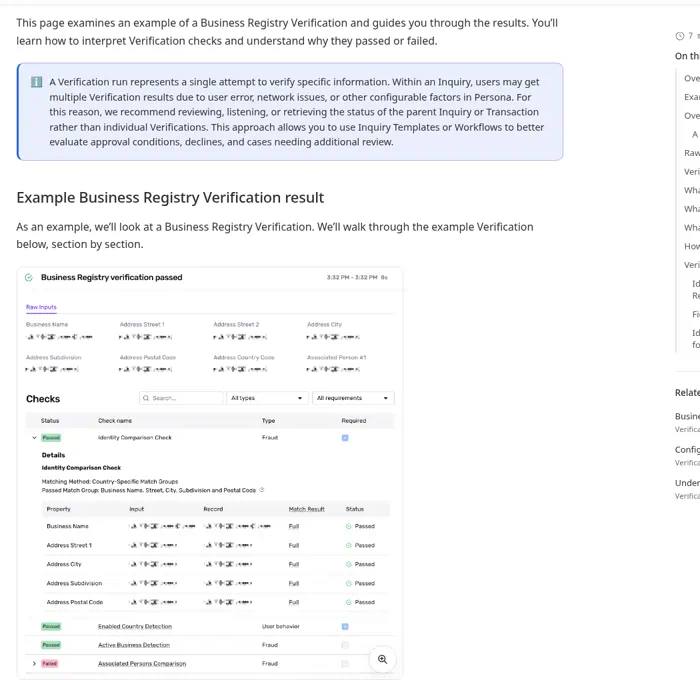
Persona against the framework:** strongest on checklist-upfront and owner/UBO invites. Strong on auto-lookup outcomes with granular pass/fail. Less of a live early-access path in the public example. Partly structural (verification layer, not the full product), but still a gap if you ship the applicant experience end to end.
Brex (and Mercury checklist)
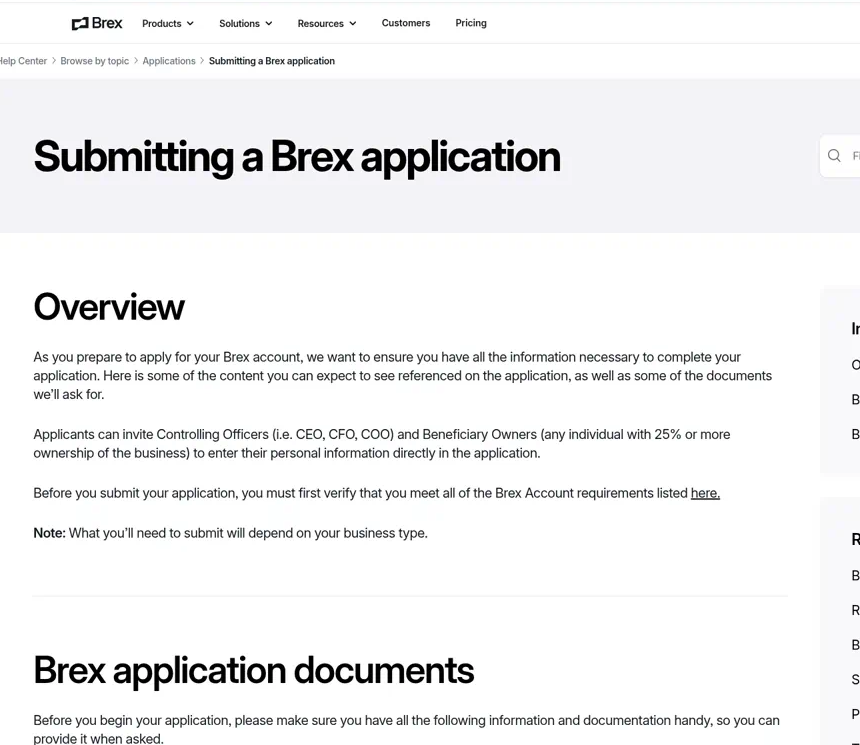
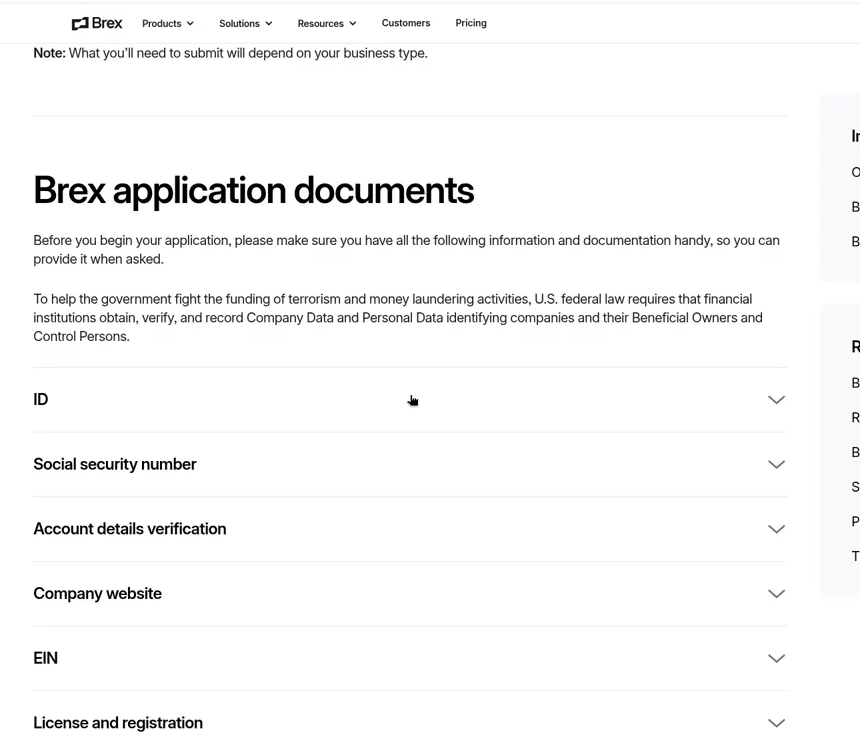
Brex's application help is what a US B2B fintech should publish before step one. Overview copy says applicants can invite Controlling Officers and Beneficial Owners to enter personal information themselves. The documents page lists ID, SSN, account details, website, EIN, license and registration, with a note that requirements depend on business type.
Mercury's gathering-documents page makes the auto-lookup promise explicit: some details may verify automatically, so you might not upload anything. Have formation docs, EIN letter, and owner IDs ready anyway.
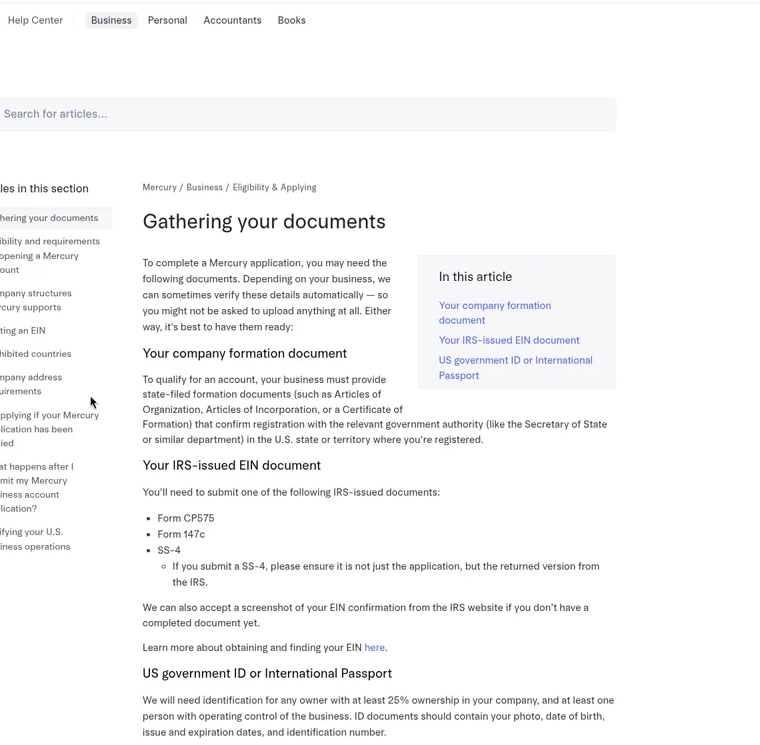
Brex and Mercury against the framework:** clear checklist and owner-invite expectations in help. Mercury names auto-verify. Neither public page we pulled is a full in-product who-owes-what status model, so we are not scoring them as winning there from these assets alone.
What the comparison actually shows
Persona nails checklist-upfront and the invite model. Stripe nails early access and stepwise progress, with better remediation than most. Brex and Mercury nail the prep list in help, and Mercury says the quiet part about auto-lookup out loud. Nobody in this set does every framework point in one place. That is the gap we keep seeing: teams ship the provider happy path and leave the multi-person, multi-outcome work for ops email.
High-level comparison
Legend: Strong = clear in the public UI or help shown here. Partial = present but incomplete for multi-person KYB. Weak = missing or only implied. n/a (help only) = scored from support copy, not a live in-product flow.
| Example | Checklist upfront | Auto-lookup | Owner invite | Actionable status | Outcome screens | Early access |
|---|---|---|---|---|---|---|
| Stripe Connect | Partial (stepwise checklist mid-flow, not every doc and person before step one) | Partial (registry/data pull not the focus of these shots) | Weak in these assets | Strong (Express named failure + Save / Skip for now) | Strong (verification summary before submit) | Strong (Furever Quickstart) |
| Persona KYB | Strong (Document Home required + optional before submit) | Strong (registry Identity Comparison vs record) | Strong (Control Person / UBO + email for Individual Info inquiries) | Partial (granular checks; less of an applicant who-owes-what console here) | Strong (distinct pass / fail checks, not one Pending) | Weak in the public example |
| Brex | Strong in help (documents list before apply) | n/a (help only) | Strong in help (invite Controlling Officers and Beneficial Owners) | n/a (help only) | n/a (help only) | n/a (help only) |
| Mercury | Strong in help (formation, EIN, owner IDs) | Strong in help (some details may verify automatically) | Partial in help (owner ID rules stated; invite UX not shown) | n/a (help only) | n/a (help only) | n/a (help only) |
Where most teams get stuck
The usual failure isn't a bad screen. It's that nobody owns the whole thing. Compliance owns the rules. Engineering owns the provider integration. Sales owns the relationship. The applicant experiences all three at once, stitched together by email.
The other trap is designing the happy path in Figma and letting engineering improvise every other state when the provider's real responses come back. That's how you end up with one "Pending" screen covering eleven different situations.
How we approach it
This is the kind of work we go looking for at UX Signal Studio. We're a small, senior-only boutique UX studio in the Bay Area, and complex, regulated products are our wedge. On a KYB flow we sit with your compliance lead and engineers, map every check, person, and outcome into one state model, and then ship it as working front-end wired to your provider's real responses. Not a Figma file that breaks the first time a registry lookup comes back partial.
AI speeds up the grunt work: listing edge cases, drafting copy for every outcome state, testing invite emails in a dozen variations. Senior people make the judgment calls, like what a skeptical director in another country needs to read before they'll upload a passport for a company they've never heard of.
A quick self-check
- Can a new applicant see every document and person you'll need before step one?
- Does an owner invite name who sent it and why, in one line?
- Can the applicant see exactly who is holding things up, and nudge them?
- Does every verification outcome have its own screen and its own next step?
- Can someone leave for two days and land back on the exact step?
If you answered no to two or more, your drop-off probably isn't a compliance problem.
Want a second set of eyes?
If you're building B2B payments, lending, banking, or any product that has to verify businesses before they can use it, and onboarding feels like it takes weeks for no good reason, we can help. Book a discovery call or email us at ash@uxsignalstudio.com with a walkthrough of your current KYB flow. We'll tell you honestly whether it's a sequencing fix, an invite fix, or a state model you need to rebuild.